How to load a DOCX document and get missing fonts in C# and .NET
- Add SautinSoft.Document from Nuget.
- Load a DOCX document from file or stream.
- Get missing fonts.
After the loading process of the DOCX documents, get the names of fonts that are not installed on your system use the FontSettingsMissingFonts property.
In addition, you can substitutes the original font with the name of an alternative font available on your system using the FontSettingsAddFontSubstitutes method.
The code example below shows how to get the names of fonts that are not installed on the system and substitutes these fonts with alternative font names.
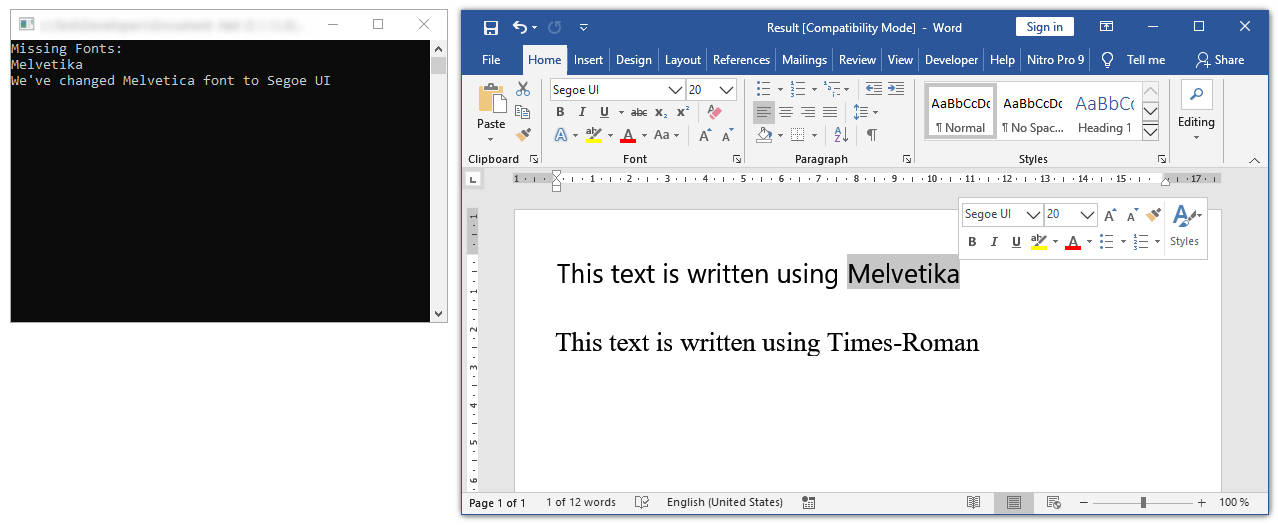
Complete code
 GitHub
using System;
using System.Collections.Generic;
using System.Linq;
using SautinSoft.Document;
namespace Example
{
class Program
{
static void Main(string[] args)
{
// Get your free trial key here:
// https://sautinsoft.com/start-for-free/
LoadDOCX();
}
/// <summary>
/// Load a DOCX document, get and replace missing fonts.
/// </summary>
/// <remarks>
/// Details: https://www.sautinsoft.com/products/document/help/net/developer-guide/load-docx-document-get-missing-fonts-net-csharp-vb.php
/// </remarks>
static void LoadDOCX()
{
string inpFile = @"..\..\..\fonts.docx";
string outFile = "Result.pdf";
// Some documents can use embedded or rare fonts which isn't installed in your system.
// This triggers the FontSelection event, where, for example, you can output
// a list of lost fonts to the console or add a replacement for them.
DocumentCore dc = DocumentCore.Load(inpFile);
List<string> MissingFonts = new List<string>();
FontSettings.FontSelection += (s, e) =>
{
// Search for embedded and missing fonts.
if (!MissingFonts.Contains(e.FontName))
MissingFonts.Add(e.FontName);
// Replacing the Dubai font with Segoe UI.
var segoe = FontSettings.Fonts.FirstOrDefault(f => f.FamilyName == "Segoe UI");
if (e.FontName == "Dubai")
{
e.SelectedFont = segoe;
Console.WriteLine("We\'ve changed Dubai font to Segoe UI");
}
};
dc.Save(outFile);
if (MissingFonts.Count > 0)
{
Console.WriteLine("Missing Fonts:");
foreach (string fontFamily in MissingFonts)
Console.WriteLine(fontFamily);
}
// Next, knowing missing fonts, you can install these fonts in your system.
// Also, you can specify an extra folder where component should find fonts.
FontSettings.FontsBaseDirectory = @"d:\My Fonts";
// Open the result for demonstration purposes.
System.Diagnostics.Process.Start(new System.Diagnostics.ProcessStartInfo(outFile) { UseShellExecute = true });
}
}
}Option Infer On
Imports System
Imports System.Collections.Generic
Imports System.Linq
Imports SautinSoft.Document
Namespace Example
Friend Class Program
Shared Sub Main(ByVal args() As String)
' Get your free trial key here:
' https://sautinsoft.com/start-for-free/
LoadDOCX()
End Sub
''' <summary>
''' Load a DOCX document, get and replace missing fonts.
''' </summary>
''' <remarks>
''' Details: https://www.sautinsoft.com/products/document/help/net/developer-guide/load-docx-document-get-missing-fonts-net-csharp-vb.php
''' </remarks>
Private Shared Sub LoadDOCX()
Dim inpFile As String = "..\..\..\fonts.docx"
Dim outFile As String = "Result.pdf"
' Some documents can use embedded or rare fonts which isn't installed in your system.
' This triggers the FontSelection event, where, for example, you can output
' a list of lost fonts to the console or add a replacement for them.
Dim dc As DocumentCore = DocumentCore.Load(inpFile)
Dim MissingFonts As New List(Of String)()
AddHandler FontSettings.FontSelection, Sub(s, e)
' Search for embedded and missing fonts.
If Not MissingFonts.Contains(e.FontName) Then
MissingFonts.Add(e.FontName)
End If
' Replacing the Dubai font with Segoe UI.
Dim segoe = FontSettings.Fonts.FirstOrDefault(Function(f) f.FamilyName = "Segoe UI")
If e.FontName = "Dubai" Then
e.SelectedFont = segoe
Console.WriteLine("We've changed Dubai font to Segoe UI")
End If
End Sub
dc.Save(outFile)
If MissingFonts.Count > 0 Then
Console.WriteLine("Missing Fonts:")
For Each fontFamily As String In MissingFonts
Console.WriteLine(fontFamily)
Next fontFamily
End If
' Next, knowing missing fonts, you can install these fonts in your system.
' Also, you can specify an extra folder where component should find fonts.
FontSettings.FontsBaseDirectory = "d:\My Fonts"
' Open the result for demonstration purposes.
System.Diagnostics.Process.Start(New System.Diagnostics.ProcessStartInfo(outFile) With {.UseShellExecute = True})
End Sub
End Class
End Namespace
If you need a new code example or have a question: email us at support@sautinsoft.com or ask at Online Chat (right-bottom corner of this page).