How to filling out a document from a database in C# and .NET
In modern software, the automation of document creation processes has become an integral part of the development of business solutions. It is often necessary to automatically fill in documents with data stored in the database in order to generate reports, certificates, contracts or other forms of documents. In this article, we will look at how to perform such a task in C# and .NET, using the popular SautinSoft Document .NET library.
The effectiveness of automated document filling:
- Saving time. Create hundreds of documents in seconds.
- Minimizing errors. Automatic data insertion eliminates the human factor.
- Easy scalability. You can expand the system to meet any business requirements.
- Unification of the design. The uniform style and format of documents for the whole enterprise.
Automation of document generation is one of the main tasks in the field of business processes and corporate information systems. This is especially true in finance, logistics, HR, and law, where the volume of documents is huge and the preparation process is regular.
Step-by-step guide:
- Add SautinSoft.Document from Nuget.
- Pass the content to the string parameter "db_content".
- Set the settings Json.
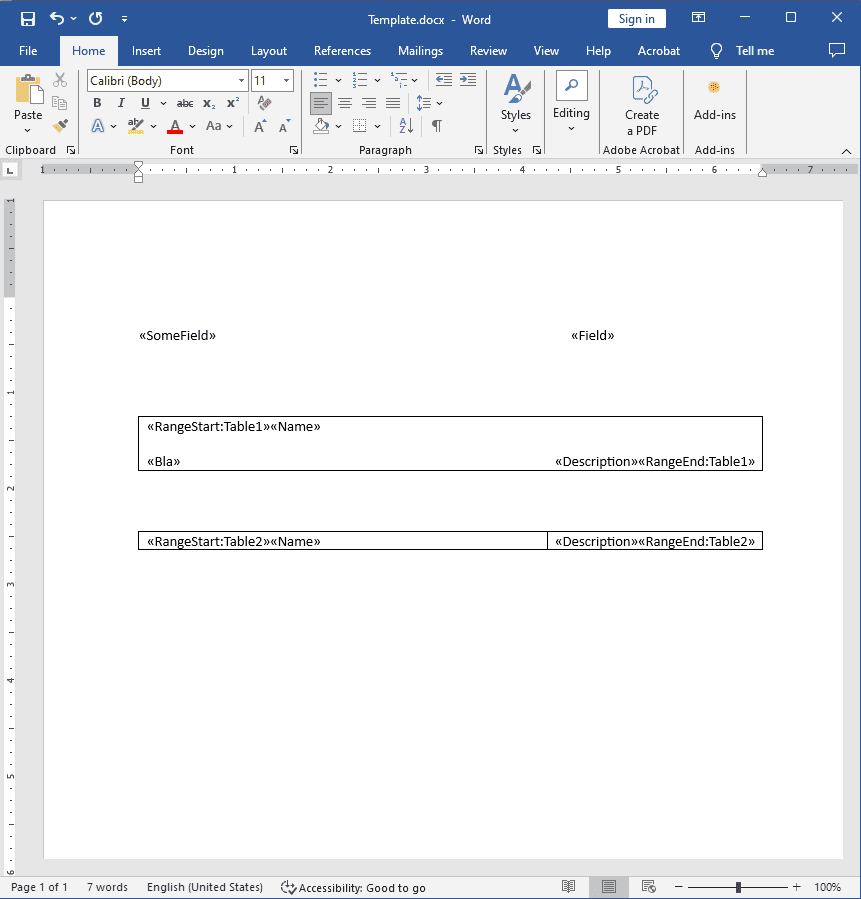
- Load a template for merging the content with "db_content".
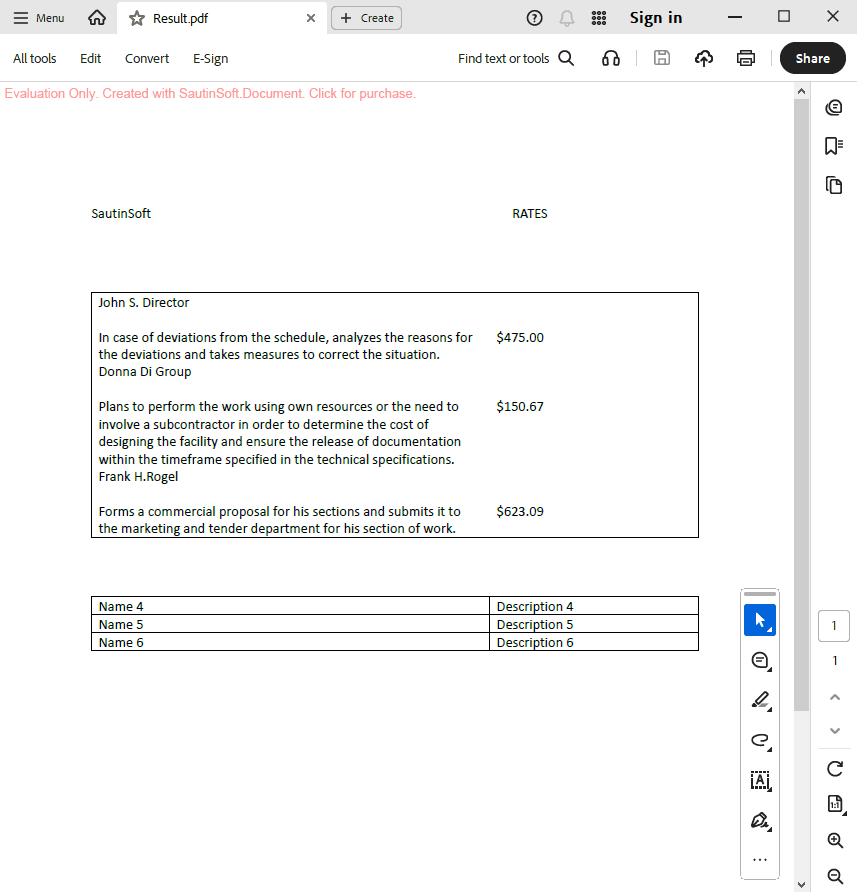
- Save the resulting file.
Input file:
Output result:
Complete code
 GitHub
using System;
using System.IO;
using System.Collections.Generic;
using SautinSoft.Document;
using System.Text.Json;
using System.Text.Json.Serialization;
namespace Sample
{
class Sample
{
static void Main()
{
// Get your free trial key here:
// https://sautinsoft.com/start-for-free/
/// <summary>
/// Filling out a document from a database.
/// </summary>
/// <remarks>
/// Details: https://sautinsoft.com/products/document/help/net/developer-guide/read_content_from_db.php
/// </remarks>
string db_content = """
{
"SomeField": "SautinSoft",
"Field": "RATES",
"Table1": [
{
"Name": "John S. Director",
"Description": "$475.00",
"Bla": "In case of deviations from the schedule, analyzes the reasons for the deviations and takes measures to correct the situation."
},
{
"Name": "Donna Di Group",
"Description": "$150.67",
"Bla": "Plans to perform the work using own resources or the need to involve a subcontractor in order to determine the cost of designing the facility and ensure the release of documentation within the timeframe specified in the technical specifications."
},
{
"Name": "Frank H.Rogel",
"Description": "$623.09",
"Bla": "Forms a commercial proposal for his sections and submits it to the marketing and tender department for his section of work."
}
],
"Table2": [
{
"Name": "Name 4",
"Description": "Description 4"
},
{
"Name": "Name 5",
"Description": "Description 5"
},
{
"Name": "Name 6",
"Description": "Description 6"
}
]
}
""";
var jsonOptions = new JsonSerializerOptions { PropertyNameCaseInsensitive = true, Converters = { new JsonObjectConverter() } };
var jsonSource = JsonSerializer.Deserialize<Dictionary<string, object>>(db_content, jsonOptions);
var document = DocumentCore.Load(@"..\..\..\Template.docx");
document.MailMerge.Execute(jsonSource);
document.Save(@"..\..\..\Result.pdf");
}
public sealed class JsonObjectConverter : JsonConverter<object>
{
public override object Read(ref Utf8JsonReader reader, Type typeToConvert, JsonSerializerOptions options)
{
// The objects ({}) are mapped as Dictionary<string, object>
// and arrays ([]) are mapped as List<Dictionary<string, object>>.
return reader.TokenType switch
{
JsonTokenType.StartObject => JsonSerializer.Deserialize<Dictionary<string, object>>(ref reader, options),
JsonTokenType.StartArray => JsonSerializer.Deserialize<List<Dictionary<string, object>>>(ref reader, options),
JsonTokenType.String => reader.GetString(),
JsonTokenType.Number => reader.GetDouble(),
JsonTokenType.True or JsonTokenType.False => reader.GetBoolean(),
_ => JsonSerializer.Deserialize<object>(ref reader, options)
};
}
public override void Write(Utf8JsonWriter writer, object value, JsonSerializerOptions options)
=> JsonSerializer.Serialize(writer, value, value.GetType(), options);
}
}
}Option Infer On
Imports System
Imports System.IO
Imports System.Collections.Generic
Imports SautinSoft.Document
Imports System.Text.Json
Imports System.Text.Json.Serialization
Namespace Sample
Friend Class Sample
Shared Sub Main()
' Get your free trial key here:
' https://sautinsoft.com/start-for-free/
''' <summary>
''' Filling out a document from a database.
''' </summary>
''' <remarks>
''' Details: https://sautinsoft.com/products/document/help/net/developer-guide/read_content_from_db.php
''' </remarks>
Dim db_content As String = " {
""SomeField"": ""SautinSoft"",
""Field"": ""RATES"",
""Table1"": [
{
""Name"": ""John S. Director"",
""Description"": ""$475.00"",
""Bla"": ""In case of deviations from the schedule, analyzes the reasons for the deviations and takes measures to correct the situation.""
},
{
""Name"": ""Donna Di Group"",
""Description"": ""$150.67"",
""Bla"": ""Plans to perform the work using own resources or the need to involve a subcontractor in order to determine the cost of designing the facility and ensure the release of documentation within the timeframe specified in the technical specifications.""
},
{
""Name"": ""Frank H.Rogel"",
""Description"": ""$623.09"",
""Bla"": ""Forms a commercial proposal for his sections and submits it to the marketing and tender department for his section of work.""
}
],
""Table2"": [
{
""Name"": ""Name 4"",
""Description"": ""Description 4""
},
{
""Name"": ""Name 5"",
""Description"": ""Description 5""
},
{
""Name"": ""Name 6"",
""Description"": ""Description 6""
}
]
}"
Dim jsonOptions = New JsonSerializerOptions With {
.PropertyNameCaseInsensitive = True,
.Converters = { New JsonObjectConverter() }
}
Dim jsonSource = JsonSerializer.Deserialize(Of Dictionary(Of String, Object))(db_content, jsonOptions)
Dim document = DocumentCore.Load("..\..\..\Template.docx")
document.MailMerge.Execute(jsonSource)
document.Save("..\..\..\Result.pdf")
End Sub
Public NotInheritable Class JsonObjectConverter
Inherits JsonConverter(Of Object)
Public Overrides Function Read(ByRef reader As Utf8JsonReader, ByVal typeToConvert As Type, ByVal options As JsonSerializerOptions) As Object
' The objects ({}) are mapped as Dictionary<string, object>
' and arrays ([]) are mapped as List<Dictionary<string, object>>.
'INSTANT VB TASK: The following 'switch expression' was not converted by Instant VB:
' return reader.TokenType switch
' {
' JsonTokenType.StartObject => JsonSerializer.Deserialize<Dictionary<string,
' object>>(ref reader, options), JsonTokenType.StartArray => JsonSerializer.Deserialize<List<Dictionary<string,
' object>>>(ref reader, options),
' JsonTokenType.String => reader.GetString(),
' JsonTokenType.Number => reader.GetDouble(),
' JsonTokenType.True or JsonTokenType.False => reader.GetBoolean(),
' _ => JsonSerializer.Deserialize<object>(ref reader, options)
' };
End Function
Public Overrides Sub Write(ByVal writer As Utf8JsonWriter, ByVal value As Object, ByVal options As JsonSerializerOptions)
JsonSerializer.Serialize(writer, value, value.GetType(), options)
End Sub
End Class
End Class
End Namespace
If you need a new code example or have a question: email us at support@sautinsoft.com or ask at Online Chat (right-bottom corner of this page).